Résumez cet article avec :
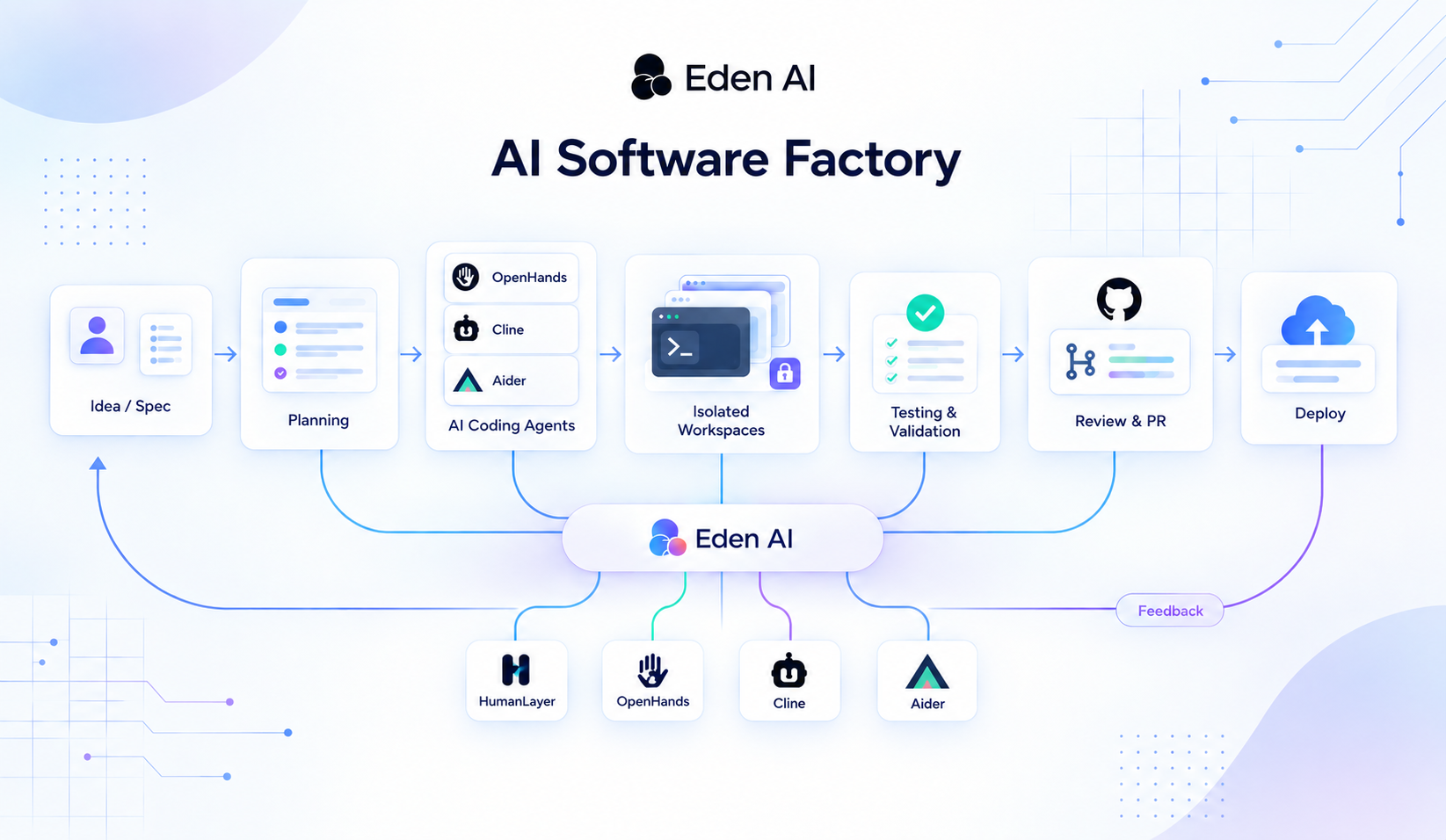
AI coding agents can now read a repository, write code, run tests and iterate. A reliable software factory needs more than an agent, though. It is a system that takes a human request through specification, planning, isolated execution, testing, review, human approval, delivery and production feedback. Factory's $200M raise at a $5B valuation shows how quickly the industry is moving from single coding agents to this kind of production system. This article breaks the factory down stage by stage and explains why each stage matters. It then shows how to assemble one from open-source building blocks: OpenHands, Cline and Aider for execution, HumanLayer's Research, Plan, Implement method for planning, Git worktrees and containers for isolation, your existing CI/CD for delivery, and a model gateway such as Eden AI for task-level model routing. The main point is that the model is only one layer. Humans stay in charge of intent and high-risk decisions, and the engineering around the model decides how reliably its output becomes working software.
AI coding agents have changed how developers work. An agent can now explore an unfamiliar repository, implement a feature, run commands, execute tests, and iterate on its own changes. Tasks that once required a sequence of manual development steps can increasingly be delegated to AI.
But there is an important distinction between having an AI agent that can write code and having a system that can reliably produce software.
That distinction is at the heart of the emerging idea of the software factory.
On September 15, 2026, AI coding company Factory announced a $200 million funding round at a $5 billion valuation, backed by Blackstone, Khosla Ventures, Sequoia Capital, and others. The valuation had more than tripled since its $1.5 billion round in April. Reuters reported on the funding, while DevOps.com highlighted the platform's expansion into code review, security, testing, documentation, and incident response. Factory itself describes this shift in its article on moving from coding agents to software factories.
The significance goes beyond a funding announcement. The industry is moving from asking whether AI can write a piece of code to exploring how much of the software development lifecycle can be organized, automated, verified, and repeated around AI agents.
A software factory is not a single coding tool or a particularly capable model. It is a system that takes software intent, such as a feature request or bug report, and turns it into a validated change through a controlled process of specification, planning, implementation, testing, review, delivery, and feedback.
From coding agents to software factories
AI-assisted development has evolved through several stages. Early tools focused on code completion, suggesting the next few lines while developers handled the surrounding work. Coding assistants expanded this interaction, helping developers understand repositories, generate functions, troubleshoot errors, and refactor code. Coding agents went further by gaining the ability to inspect files, execute commands, modify code, and work toward a defined goal.
Projects such as Cline, OpenHands, and Aider demonstrate different approaches to this agentic model. Cline offers a modular agent runtime, OpenHands provides infrastructure for programmable coding agents, and Aider focuses on terminal-based pair programming with Git integration and separate planning and editing modes.
A software factory builds on these capabilities by connecting them to the rest of the development process. Rather than asking one agent to handle everything in a single interaction, it gives each stage a defined responsibility and establishes how work moves between them.
The process begins before implementation. A request such as “add passwordless authentication” needs more detail before an agent can implement it reliably. The system may need to establish the authentication mechanism, session behavior, link expiry rules, existing components to reuse, security constraints, and acceptance criteria.
Once the intended outcome is clear, the factory can turn the specification into a plan. A larger feature might involve a magic-link endpoint, email integration, database changes, frontend behavior, and integration tests. These tasks have dependencies and may be suitable for different agents or execution environments.
This separation between understanding a problem and implementing its solution is central to several existing workflows. Aider's architect mode separates high-level reasoning from file editing, while Cline offers Plan and Act modes. HumanLayer's Research, Plan, Implement approach similarly encourages agents to investigate a codebase, produce a reviewable plan, and implement against it.
The principle is straightforward: for complex tasks, an agent should not have to discover the entire problem and implement the solution at the same time.
Once the plan is ready, coding agents become the execution layer. Different projects offer useful building blocks for this stage.
OpenHands provides a Software Agent SDK for working with agents, tools, conversations, workspaces, and events. Its Agent Server exposes a REST API, while Agent Canvas provides a self-hosted control center that can coordinate supported coding agents across local environments, Docker, virtual machines, and remote servers. It also supports automations triggered by schedules and webhooks.
Cline extends beyond its original IDE experience with a CLI, an SDK, and a web-based Kanban workflow. Its Kanban project gives tasks their own Git worktrees, allowing multiple agents to work in parallel. The open-source components include the CLI, SDK, VS Code extension, and Kanban; its JetBrains plugin is not open source.
Aider takes a more focused approach, combining repository context, Git integration, automatic commits, and automated linting and testing.
These tools do not need to compete to become the one platform responsible for everything. A factory can combine them according to the needs of the workflow. Its orchestration layer should remain separate from the agent executing a particular task, making it easier to replace or upgrade that agent later.
Isolation, testing, and review make automation reliable
Giving an agent access to a repository is not enough to make its work safe to run automatically. As soon as multiple tasks execute concurrently, the factory needs controlled environments, validation, and review.
Isolation allows agents to work without interfering with one another. Git worktrees, branches, containers, virtual machines, and ephemeral environments can keep changes separate and make each task easier to reproduce and inspect. An agent implementing authentication, for example, should not accidentally overwrite the work of another agent fixing a billing issue.
Isolation also provides a useful boundary for permissions and recovery. If a task fails, its environment and changes can be inspected without compromising unrelated work. This becomes increasingly important as agents receive more autonomy or access to external tools.
After implementation comes validation. An agent's claim that a feature works is not evidence that it does. A reliable factory incorporates checks into the execution loop: implement the change, run the relevant tests, inspect failures, adjust the code, and run the checks again.
Depending on the project, validation can include unit and integration tests, end-to-end tests, type checking, linting, static analysis, security checks, API tests, and browser-based tests. Tools such as Aider already demonstrate this approach by running linting and tests automatically and attempting to address the issues they reveal.
These checks provide evidence that a change meets defined requirements. They do not prove that every possible problem has been eliminated, but they give the factory a more reliable basis for deciding what happens next.
Review remains a separate responsibility. Code can pass its tests while introducing duplicated logic, violating architectural conventions, creating security issues, or solving the wrong problem. Automated review can compare a diff against the specification, repository conventions, dependency policies, and security requirements. A second agent can also examine the change from a different perspective than the implementation agent.
However, automated review is not a substitute for human judgment. High-risk changes involving authentication, payments, infrastructure, security, or production data may require explicit approval before they proceed.
The level of autonomy should reflect the risk. A documentation update may need only automated checks, while a change to a payment system may require additional tests, security review, and human authorization.
The goal is therefore not to eliminate human involvement. It is to direct human attention toward the decisions that need it most.
From pull requests to continuous feedback
Once a change passes its validation and review requirements, the factory can produce familiar engineering artifacts: a branch, commits, and a pull request.
This is one of the most practical ways to introduce software factory workflows into an existing team. Git remains Git, pull requests remain pull requests, and existing CI/CD pipelines can continue to build, test, and deploy the application. The factory automates more of the work needed to produce a reviewable change without requiring the team to replace its development infrastructure.
The workflow does not have to stop at the pull request. After approval and merging, the change can move through the existing deployment process, followed by post-deployment checks and production monitoring.
The resulting signals can then feed the next development cycle. An unexpected error might become a new issue, while recurring failures could reveal weaknesses in the implementation workflow or its validation rules.
This is why observability belongs inside the factory architecture. Each run should retain enough information to understand what happened, including the original request, specification, plan, model selection, tool calls, files modified, test results, review findings, approvals, commits, and deployment status.
That information supports debugging, auditing, and continuous improvement. It can help teams identify which tasks fail most often, where human intervention is needed, how model choices affect cost and performance, and which parts of the workflow need attention.
Factory's software factory architecture guide identifies intake, context, planning, execution, review, delivery, and observability as core components of the system. Its Agent Effectiveness feature also addresses the question of measuring what AI spending actually produces.
A factory can therefore become more than a system that executes tasks. It can become a system that helps teams understand and improve how software is produced, using recorded outcomes and operational signals rather than relying on assumptions about agent performance.
Model routing: keeping the factory independent from individual models
The factory's orchestration logic should not be tightly coupled to one AI model. If the underlying model changes, the rest of the development process should not need to be redesigned.
This separation matters because software development involves different types of work. Classifying an incoming issue, planning an architectural change, implementing code, and reviewing a security-sensitive diff can require different capabilities. A model that is suitable for a quick classification task may not be the right choice for complex reasoning or multimodal analysis.
A factory can route work according to factors such as reasoning requirements, context size, latency, cost, modality, and availability. Planning might use a model suited to long-context reasoning, routine classification might use a faster and less expensive option, and review might use a different model to provide an independent perspective.
Factory describes this approach through its model independence strategy and Factory Router. The company says its router reduces token spending by more than 60%; this is a vendor-reported claim rather than a universal result. Open-source tools such as Cline and Aider also support multiple model providers, making model choice a configurable part of the workflow.
A model gateway can make this separation easier to implement. For example, Eden AI provides an OpenAI-compatible AI Gateway for accessing models from multiple providers through a consistent interface. This allows the factory to manage model selection separately from task orchestration and reduces the need to maintain a different integration for each provider.
A simple Python implementation could define one client and map each workflow stage to a model:
import os
from openai import OpenAI

# One client for every stage of the factory, pointed at the Eden AI gateway
client = OpenAI(
    api_key=os.environ["EDENAI_API_KEY"],
    base_url="https://api.edenai.run/v3",
)

# The routing policy: which model handles which kind of work
ROUTES = {
    "planning": "anthropic/claude-sonnet-4-5",  # long-context reasoning
    "classification": "openai/gpt-4o-mini",     # fast and cheap triage
    "review": "google/gemini-2.5-pro",          # an independent second opinion
}

def run_stage(stage: str, prompt: str) -> str:
    response = client.chat.completions.create(
        model=ROUTES[stage],
        messages=[{"role": "user", "content": prompt}],
    )
    return response.choices[0].message.content

plan = run_stage("planning", "Write an implementation plan for passwordless login: ...")
review = run_stage("review", f"Review this plan against the spec and flag risks:\n{plan}")
The example illustrates the architectural pattern rather than a complete production implementation. A real factory would also need structured inputs and outputs, error handling, retry policies, validation, permission boundaries, and logging.
With model selection separated into a routing configuration, changing the model for a stage can be as simple as updating one entry. The workflow itself can remain unchanged, while usage and cost information can feed into the factory's observability layer.
Assembling an open-source software factory
Building a software factory does not require recreating a commercial platform from scratch. The open-source ecosystem already provides many of the components needed for a first implementation.
A practical starting point could connect a GitHub issue to a planning workflow, use an agent to inspect the repository and prepare a plan, execute the task with OpenHands, Cline, or Aider, and run it inside an isolated Git worktree or container. The resulting changes would pass through the project's existing tests and automated checks before being submitted as a pull request for human review.
Once this basic workflow is reliable, the system can evolve incrementally. Teams can add automated review, task-specific model routing, stronger permission controls, deployment automation, and observability without redesigning the entire process.
HumanLayer deserves a qualification here. Its public repository states that much of the code is deprecated and points to a rebuilt product at humanlayer.com. It is therefore useful to distinguish its workflow ideas, particularly Research, Plan, Implement and explicit human checkpoints, from the status of the repository as an installable component.
A first implementation should focus on one repeatable path rather than automating every stage at once. The more freedom agents receive, the more important sandboxing, permissions, validation, observability, and recovery become. For example, running an agent server without an appropriate sandbox can give it access to the host filesystem.
A software factory should therefore be treated as an engineering system in its own right. Its reliability depends not only on the models it uses, but also on the context it provides, the actions it permits, the evidence it collects, and the rules that determine when a task can proceed.
From one agent to a software production system
The progression can therefore be summarized in four stages.
An AI assistant helps a developer write code.
A coding agent can take a development task and execute it.
A multi-agent workflow coordinates several agents or specialized stages.
A software factory connects those agents to the rest of the software lifecycle, creating a repeatable loop from intent to validated change and back to new work.
This is why the software factory concept is more significant than another generation of coding assistants.
The important change is not simply that AI can write more code.
It is that software development can increasingly be organized as a system in which humans define intent and constraints, agents perform increasingly large portions of execution, automated systems provide evidence, and humans remain responsible for the decisions that require judgment.
The next bottleneck is not writing code
As agents take on more implementation work, the difficult parts of software engineering shift. Defining the right problem, understanding the existing codebase, establishing constraints, verifying the outcome, and deciding when human intervention is necessary become increasingly important.
This is why a software factory is more than a collection of coding agents or a carefully written prompt. It connects structured intent, planning, execution, isolation, validation, review, delivery, and feedback into a repeatable process.
The open-source tools already provide many of the necessary building blocks. OpenHands offers a programmable agent runtime, Cline provides a modular coding-agent environment, Aider demonstrates a focused Git-based workflow, and HumanLayer's research offers useful patterns for separating planning from implementation and preserving human checkpoints.
The interesting question is no longer simply:
How do I get an AI to write code?
It is:
How do I build a system that can reliably turn software intent into validated changes?
That is the idea behind an open-source software factory. And its most useful form may not be a completely autonomous system where humans disappear, but one where developers spend less time on repetitive implementation and more time defining what should be built, setting constraints, reviewing important decisions, and improving the system that produces the software.


%20(1).png)