Summarize this article with:
- LiteLLM is best when your team wants full infrastructure control and has dedicated DevOps or platform capacity to operate it reliably.
- A hosted AI gateway usually has a lower total cost for smaller and mid-sized teams once engineering time, on-call work, upgrades, Redis, Postgres, and monitoring are included.
- Self-hosting LiteLLM can become more economical at very high usage volumes, especially when the company already operates the required infrastructure and platform team.
- Eden AI is broader than a standard LLM gateway because it also provides OCR, speech, translation, vision, document parsing, and image generation through one API.
- The practical decision is simple: choose LiteLLM for control, on-premises requirements, or scale economics; choose a hosted gateway when reducing operational burden, security risk, and time to production matters more.
In March 2026, malicious LiteLLM versions 1.82.7 and 1.82.8 were published to PyPI. The compromised packages contained malware capable of credential theft and remote code execution and remained live for around 40 minutes before quarantine.
The incident highlights a key trade-off of self-hosted AI infrastructure. LiteLLM gives teams control over deployment, routing, and data flows, but also makes them responsible for security, patching, monitoring, availability, and incident response.
A hosted AI gateway reduces that operational burden, but introduces trade-offs around cost, customization, control, and vendor dependency.
This guide compares LiteLLM with hosted AI gateways across total cost of ownership, security, reliability, features, and migration effort, helping teams decide which approach is more sustainable as traffic and compliance requirements grow.
What Is LiteLLM? SDK, Proxy, and Where It Fits
LiteLLM refers to two related open-source tools: the LiteLLM SDK, which runs inside a Python application, and the LiteLLM Proxy, a self-hosted gateway deployed between applications and AI providers.
Both tools provide access to more than 100 LLMs from providers such as OpenAI, Anthropic, Google, Cohere, AWS Bedrock, and Azure. The main decision point is operational ownership. With the LiteLLM Proxy, your team must manage deployment, credentials, upgrades, monitoring, scaling, availability, and incident response.
LiteLLM is therefore a strong fit for teams that need full infrastructure control and already have sufficient DevOps or platform engineering capacity. Its flexibility is valuable, but the operational cost increases as traffic, security requirements, and reliability expectations grow.
What Is a Hosted AI Gateway?
A hosted AI gateway is a managed API layer that connects an application to multiple AI models and providers. Developers use a single integration to send requests, switch models, track usage, and handle provider-specific differences without deploying or maintaining the gateway infrastructure.
Hosted vs. self-hosted architecture:
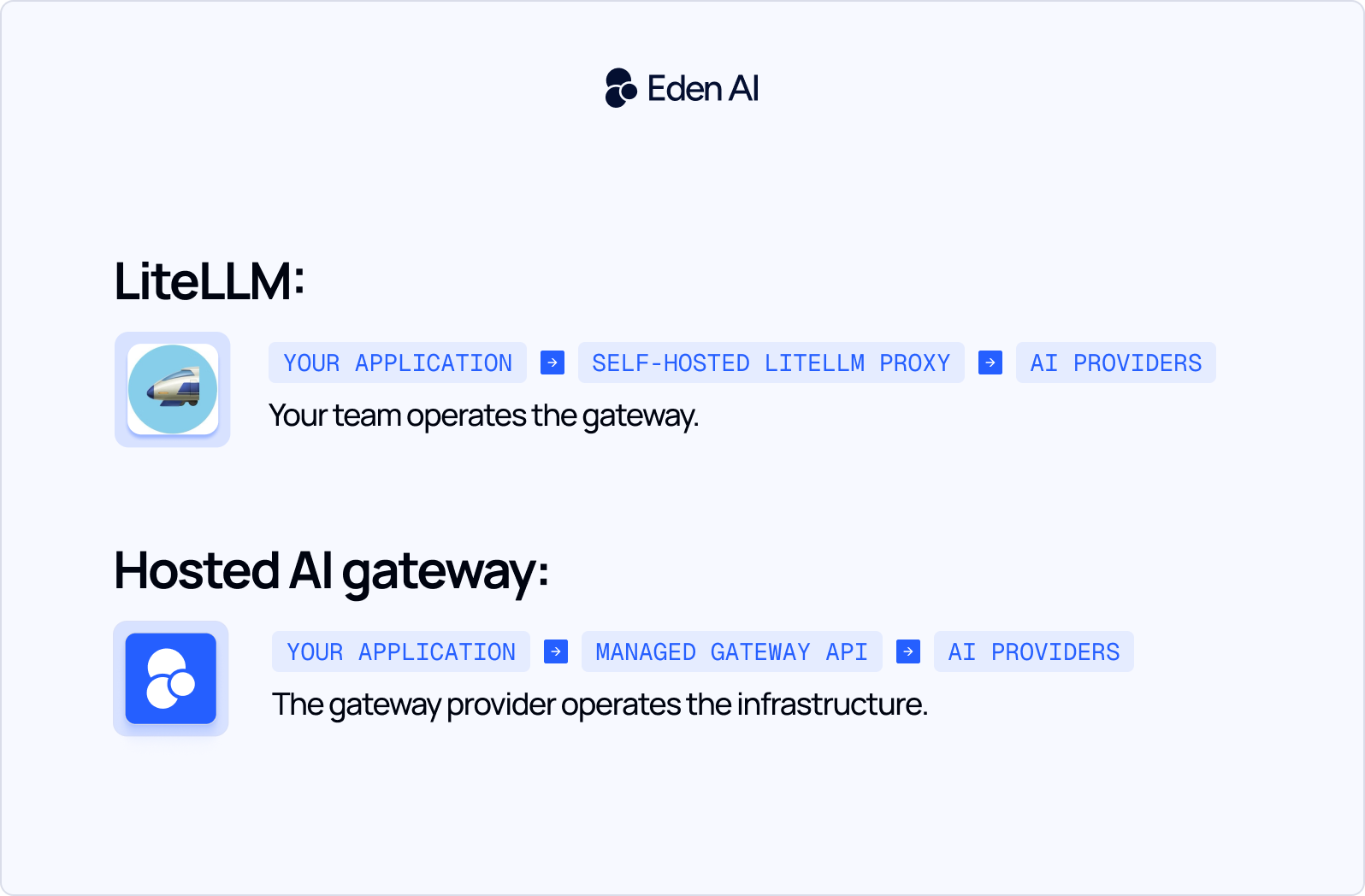
Eden AI is an example of a hosted AI gateway. It provides a unified API for accessing more than 100 AI models while centralizing authentication, provider management, routing, and usage tracking.
Its scope extends beyond LLM chat and text-generation APIs. Eden AI also supports AI capabilities such as OCR, document parsing, speech-to-text, text-to-speech, translation, image generation, and computer vision.
This makes Eden AI an AI services gateway, rather than only an LLM proxy. Teams can manage several AI workloads through the same platform instead of integrating and maintaining a separate provider or gateway for each capability.
Eden AI uses usage-based billing linked to AI provider consumption, without requiring customers to operate separate gateway infrastructure.
The 5 Real Trade-offs: Self-Hosted vs. Managed AI Gateways
1. Total Cost of Ownership
LiteLLM is free to install, but production use requires infrastructure, monitoring, databases, deployment automation, and engineering time. A managed gateway replaces much of this fixed operational cost with usage-based pricing.
Verdict: Self-hosting is cheaper when you already have available platform capacity. Otherwise, managed infrastructure may have a lower total cost.
2. Security and Supply Chain Risk
Self-hosting makes your team responsible for packages, container images, dependencies, vulnerability scanning, credentials, and incident response. A managed gateway operates this software layer for you, although its certifications, retention policies, subprocessors, and security procedures still need to be reviewed.
Verdict: Choose self-hosting for maximum control. Choose managed to reduce supply-chain responsibility.
3. Operational Burden
Running LiteLLM in production requires upgrades, scaling, databases, caching, monitoring, high availability, and on-call support. A hosted gateway removes most gateway-specific infrastructure work, while your team continues to monitor model quality, latency, and spending.
Verdict: Self-hosting works best when gateway operations already fit within an existing platform team.
4. Feature Scope
LiteLLM is primarily designed for LLM-related workloads such as chat, embeddings, and reranking. Eden AI also supports OCR, document parsing, speech, translation, image generation, and computer vision through one API.
Verdict: Choose LiteLLM for an LLM-focused stack. Choose Eden AI when you need several categories of AI service.
5. Latency and Reliability
Self-hosting gives teams control over regions, infrastructure sizing, and performance tuning, but also makes them responsible for uptime, autoscaling, and failover. A managed gateway adds another service dependency but reduces reliability and maintenance work.
Verdict: Choose LiteLLM for maximum performance control. Choose managed infrastructure when reducing operational risk matters more than saving a few milliseconds.
True Cost of Running LiteLLM in Production
LiteLLM is free to install, but production costs come from infrastructure, engineering time, support, and operational risk. Model usage costs are usually similar whether requests pass through LiteLLM or a managed gateway, assuming the same provider and model are used.
The infrastructure itself may cost only $160-$550 per month. The main hidden cost is engineering time spent on deployment, upgrades, monitoring, security, scaling, backups, and incident response.
A managed gateway replaces most of these fixed operational costs with a platform fee. For example, a 5.5% fee adds $55 to a $1,000 monthly model bill, or $550 to a $10,000 bill.
Self-hosting can still be more economical when the company already operates the required infrastructure, has available platform capacity, reaches very high model volumes, or requires on-premises deployment and full infrastructure control.
Bottom line: compare the annual cost of operating LiteLLM with the fee paid to avoid operating it, not with its free licence price.
Feature Comparison: LiteLLM vs Eden AI (and the Field)
A useful LiteLLM comparison must separate deployment control from product scope. LiteLLM, Eden AI, Portkey, and Helicone can all sit between an application and model providers, but they are optimized for different operational problems.
LiteLLM is optimized for control. It is a strong choice for teams that want to own deployment, provider credentials, routing behavior, and data flows. At sufficient scale, it can also be cost-effective, provided the company already has platform engineering capacity. Its main trade-off is that infrastructure, upgrades, security, and uptime remain internal responsibilities.
Eden AI is differentiated by scope. The LiteLLM vs Eden AI decision is not only self-hosted versus managed. Eden AI acts as a broader AI services gateway, covering LLMs alongside OCR, speech, translation, vision, and image generation.
Portkey is optimized for enterprise routing, governance, guardrails, and flexible deployment. Helicone is strongest when observability, debugging, evaluations, and request analytics are the primary requirements.
The best LLM gateway therefore depends on whether the team prioritizes infrastructure control, broad AI coverage, enterprise governance, or deep production visibility.
LiteLLM vs Hosted AI Gateway: Which Should You Choose?
The right choice depends less on the number of features than on your team’s operational capacity, compliance requirements, and need for infrastructure control.
Seed and early-stage startups
A hosted gateway is usually the practical choice when there is no dedicated DevOps or platform team. It lets engineers integrate one API and focus on product development instead of operating proxy infrastructure, databases, monitoring, and upgrades.
Series A and growth-stage companies
At this stage, compare the full cost of self-hosting with managed pricing. LiteLLM may be appropriate when an established platform team has the skills and available capacity to operate it. Otherwise, maintenance, security, and on-call work often make a managed gateway more economical.
Enterprise and regulated organizations
Start with compliance and deployment constraints. A managed provider can offer security controls, auditability, access management, and contractual SLAs. Self-hosting may still be necessary for strict on-premises, sovereign-cloud, or air-gapped requirements.
Decision rule: Choose LiteLLM when infrastructure ownership is required and your platform team has the capacity to maintain it. Choose a hosted gateway when engineering time is better spent building the product.
How to Migrate from LiteLLM to Eden AI (With Code)
Migrating from LiteLLM to Eden AI does not require a full application rewrite. For a basic chat integration, the main changes are authentication, the API endpoint, and the model identifier.
Step 1: Get your Eden AI API key
Create an Eden AI account and generate an API key from the dashboard. Store it in an environment variable rather than committing it to your source code.
Step 2: Replace the LiteLLM call
Before, your application calls LiteLLM through its Python SDK:
import litellm

response = litellm.completion(
    model="gpt-4o",
    messages=[
        {"role": "user", "content": "Summarize this contract."}
    ]
)

summary = response.choices[0].message.content
After, send the same conversation to Eden AI’s OpenAI-compatible endpoint:
import os
import requests

response = requests.post(
    "https://api.edenai.run/v3/chat/completions",
    headers={
        "Authorization": f"Bearer {os.environ['EDENAI_API_KEY']}",
        "Content-Type": "application/json",
    },
    json={
        "model": "openai/gpt-4o",
        "messages": [
            {
                "role": "system",
                "content": "You are a contract analyst.",
            },
            {
                "role": "user",
                "content": "Summarize this contract.",
            },
        ],
    },
    timeout=60,
)

response.raise_for_status()
summary = response.json()["choices"][0]["message"]["content"]
Eden AI uses the provider/model format, such as openai/gpt-4o, anthropic/claude-sonnet-4-5, or google/gemini-2.5-flash. The response follows the OpenAI chat-completions structure, so most downstream parsing can remain unchanged.
Step 3: Map routing and fallback rules
Replace LiteLLM model aliases with explicit Eden AI model names. Where LiteLLM previously handled fallbacks, add backup models to the request:
"model": "openai/gpt-4o",
"fallbacks": [
    "anthropic/claude-sonnet-4-5",
    "google/gemini-2.5-flash",
]
Start with the same primary model used in production. Introduce fallback changes separately so you can measure their effect on output quality and cost.
Step 4: Test application behavior
Run both integrations against a representative test set. Compare response quality, latency, token usage, errors, structured outputs, and provider-specific parameters. Pay particular attention to timeouts, rate limits, streaming, tool calls, and any code that depends on LiteLLM-specific exception classes.
Step 5: Roll out gradually
Place the gateway selection behind a feature flag or configuration variable. Route a small percentage of production traffic through Eden AI, monitor the results, and increase traffic gradually. Keep the LiteLLM path available during the validation period.
Once the Eden AI route is stable, remove the LiteLLM proxy deployment, Redis and Postgres resources, unused provider credentials, monitoring rules, and gateway-specific on-call procedures.

.jpg)


