Summarize this article with:
- An AI Gateway provides a set of core features that help manage how applications access and use AI models.
- Gateways track metrics such as latency, errors, token usage, and model activity .
- An API Gateway is built for traditional application APIs, while an AI Gateway is built for AI workloads and adds features like model routing, token tracking, prompt security, and cost control.
- Provider coverage: Look at how many AI providers and models the gateway supports, and how easy it is to switch between them.
- What Is an AI Gateway ?
What Is an AI Gateway?
An AI Gateway is a platform that helps businesses and developers connect, manage, and use multiple AI models through one interface. Instead of integrating separate APIs from providers like OpenAI, Anthropic, or Google, users can access them from a single platform.
For example, instead of connecting individually to OpenAI, Claude, and Gemini, a company can use an AI Gateway to access all three in one place. This becomes even more useful in more advanced use cases. A business might want to use one model to answer customer questions, another to detect sentiment in messages, and another to analyze images sent by users.
How Does an AI Gateway Work?
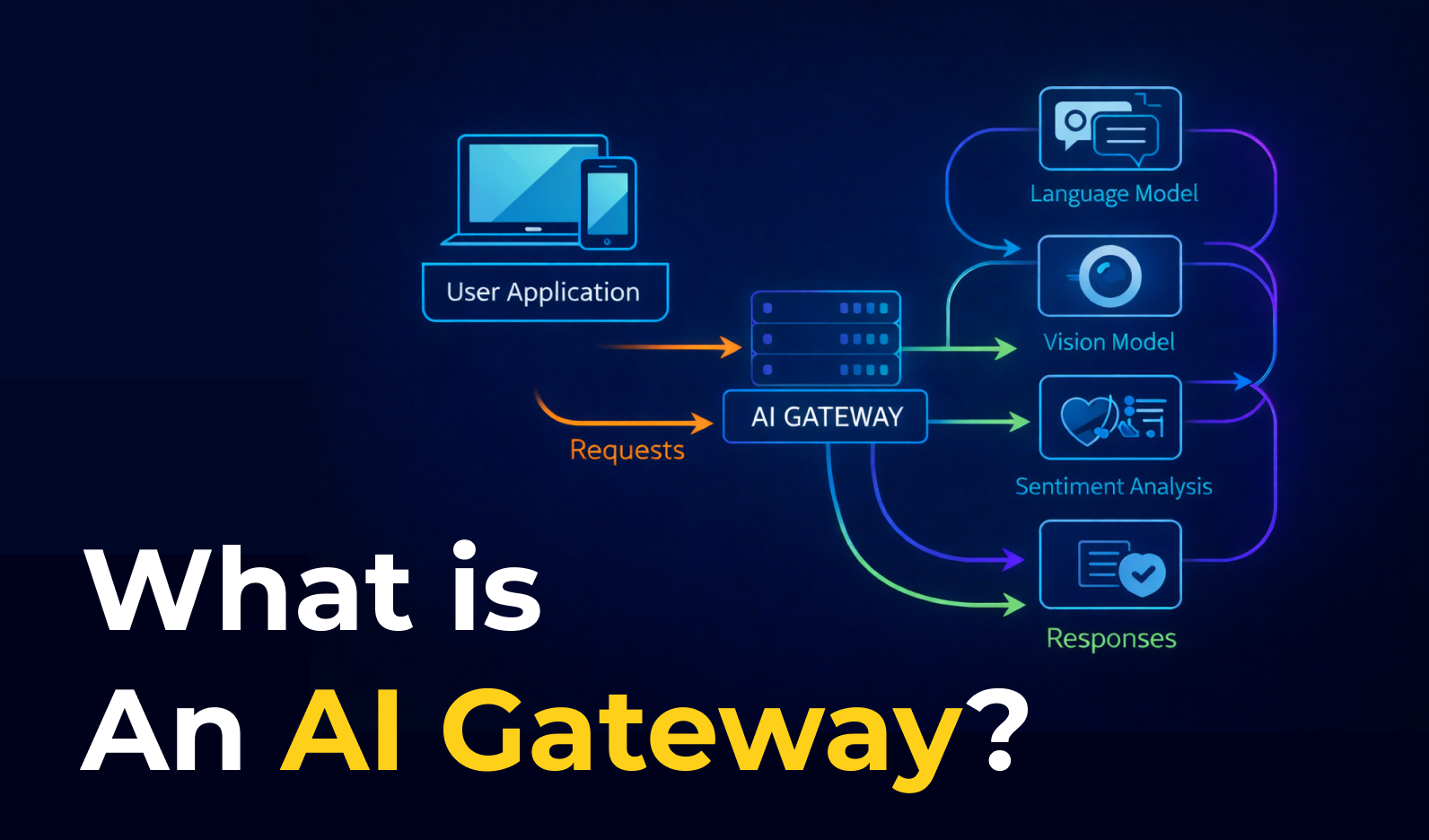
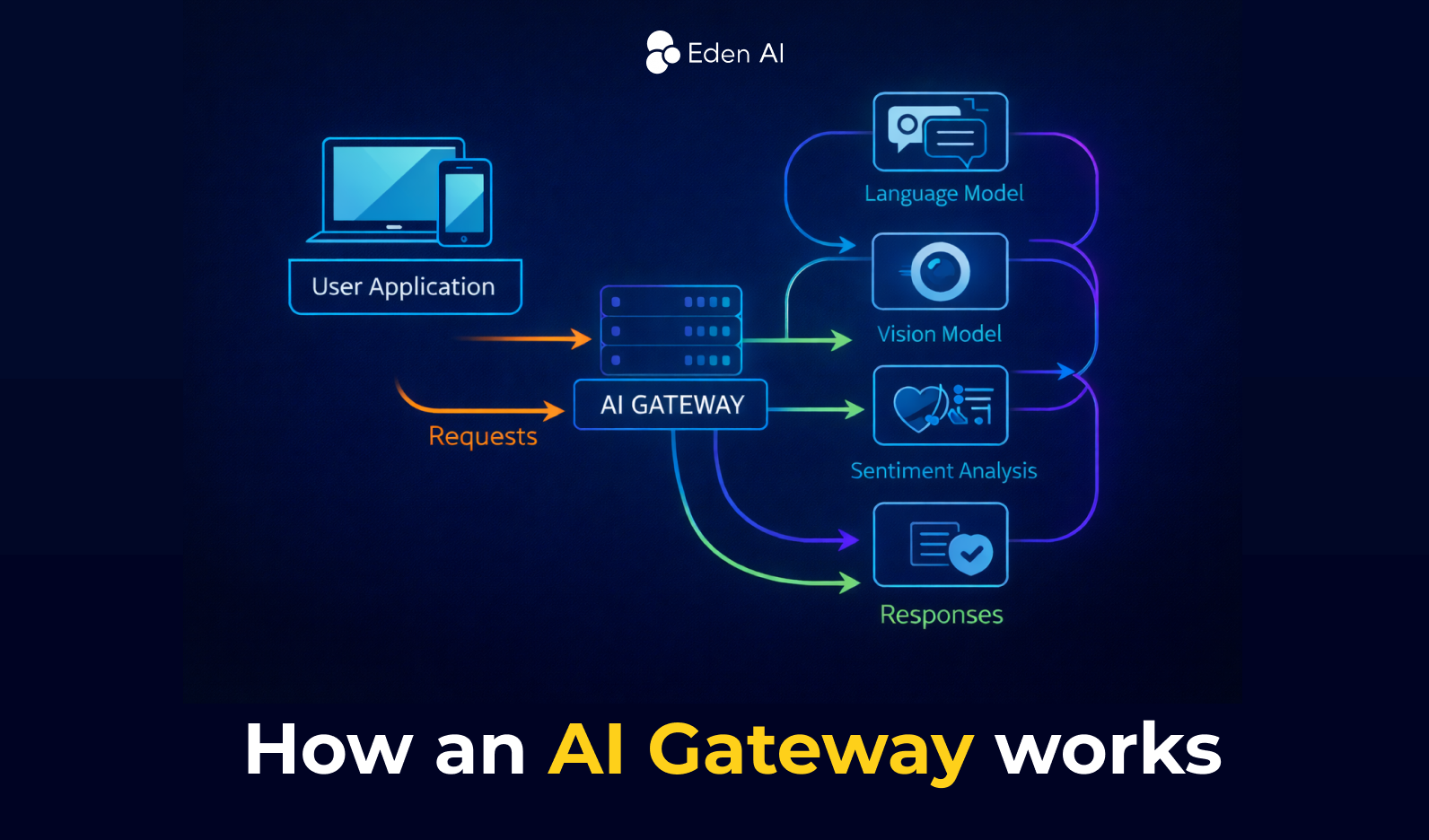
An AI Gateway acts as a layer between your application and the AI models you use. Every request goes through the gateway before reaching the model.
First, when a user sends a request, the AI Gateway receives it. For example, a customer may send feedback to your application that includes both text and an image.
Next, the gateway processes the request and decides where each part should go. It can send the text to a large language model, the image to a vision model, and the same message to a sentiment analysis model. At the same time, it can apply rules such as authentication, security checks, and data filtering.
Finally, once the models return their outputs, the AI Gateway combines the results into one standardized response and sends it back to the application.
Key Features of an AI Gateway
An AI Gateway provides a set of core features that help manage how applications access and use AI models. It offers a unified API to connect to multiple providers, routes requests to the appropriate model, enforces security and usage policies, monitors performance and costs, and ensures scalable and reliable AI operations from a centralized control layer.
Unified API Access
An AI Gateway exposes one standardized API endpoint for multiple AI models and providers. This unified interface hides differences between provider APIs, making it easier for developers to integrate and switch between models without changing their application code.
Model Routing and Orchestration
The gateway decides which AI model should process each request. It can dynamically route requests based on performance, cost, or use case, while also managing model lifecycle operations such as deployment, versioning, updates, and rollbacks.
Security and Access Control
AI gateways enforce authentication, authorization, and encryption to protect AI systems. They can filter sensitive data, prevent prompt injection attacks, and apply policies that control who can access specific models or datasets.
Usage Control and Cost Management
The gateway helps manage AI consumption through rate limiting, quotas, and token tracking. This allows teams to monitor usage and prevent excessive costs when using external AI providers.
Monitoring and Observability
AI gateways track performance metrics such as latency, errors, token usage, and request volume. Centralized logging and dashboards provide visibility into AI activity, helping teams detect issues quickly and optimize performance.
Data Processing and Transformation
Before sending requests to models, the gateway can clean, normalize, enrich, or transform data. This includes adding context to prompts, filtering sensitive information, or formatting data so that it works consistently across different models.
Scalable Inference and Model Serving
AI gateways manage load balancing and scalable model serving, ensuring that AI requests are distributed across available model instances. This enables reliable real-time or batch inference even when workloads increase.
Benefits of Using an AI Gateway
Using an AI Gateway helps teams manage AI models more securely and efficiently by controlling everything from one layer, instead of building complex infrastructure for routing, monitoring, and security.
Stronger security
AI gateways protect applications by enforcing authentication, role-based access control (RBAC), credential management, and data protection policies. They reduce the risk of sensitive data leaks and help defend against threats like prompt injection or malicious API usage.
Simplified AI management
A centralized gateway makes it easier to manage multiple AI models and providers. Developers can control routing, policies, monitoring, and usage tracking from a single place instead of maintaining separate integrations.
Better scalability and performance
AI gateways automatically balance traffic across model instances, optimize resource usage, and maintain stable performance as AI workloads grow.
Improved observability and monitoring
Gateways track metrics such as latency, errors, token usage, and model activity. This visibility helps teams detect issues early and optimize costs and performance.
Faster development and deployment
By integrating with CI/CD pipelines and DevOps workflows, AI gateways enable faster experimentation, easier updates, and quicker deployment of AI-powered features.
Easier innovation with multiple AI services
AI gateways provide unified access to different AI models and providers, allowing teams to test, switch, or combine models quickly when building new AI applications.
AI Gateway vs API Gateways: What’s the Difference?
An API Gateway is built for traditional application APIs, while an AI Gateway is built for AI workloads and adds features like model routing, token tracking, prompt security, and cost control.
When Should You Use an AI Gateway?
An AI Gateway is the better choice when your application relies on LLMs or other AI models. It adds AI-specific features such as model routing, fallback between providers, token tracking, prompt filtering, data masking, and AI cost monitoring.
Typical cases:
- using multiple AI providers like OpenAI, Anthropic, or Mistral
- routing prompts to different models
- tracking token usage and AI costs
- adding guardrails and security for prompts and responses
- managing AI performance, failover, and observability
When Should You Use an API Gateway?
An API Gateway is the right choice when your application mainly connects to backend services, databases, or microservices through traditional APIs. It helps with request routing, authentication, rate limiting, caching, and monitoring.
Typical cases:
- managing REST, GraphQL, or gRPC APIs
- exposing microservices through one entry point
- securing backend services
- controlling traffic between clients and internal systems
How to Choose an AI Gateway
Choosing the right AI gateway in 2026 requires evaluating different critical factors further than basic model routing. Here are 10 key criteria that you should take into consideration when comparing different AI Gateway:
- Performance: Check latency, throughput, and how well the gateway handles production-scale traffic.
- Provider coverage: Look at how many AI providers and models the gateway supports, and how easy it is to switch between them.
- Reliability: Prioritize features such as failover, retries, and load balancing to reduce downtime.
- Observability: Make sure the platform offers strong monitoring, logging, and debugging tools for AI requests.
- Cost control: Choose a gateway that helps track usage, manage budgets, and optimize model spend.
- Security and compliance: Review authentication, governance policies, data protection, and compliance support.
- Deployment options: Consider whether you need a cloud-based, hybrid, or self-hosted AI gateway.
- Developer experience: Evaluate setup speed, API compatibility, documentation, and ease of integration.
- Future-proofing: Check support for emerging standards such as MCP, agent workflows, and advanced orchestration.
- Ecosystem fit: The best AI gateway should integrate smoothly with your existing infrastructure and tools.
While choosing an AI Gateway, teams building production AI systems should prioritize performance, reliability, and observability, while enterprises may care more about governance, compliance, and ecosystem fit. Startups and developers testing multiple models may prioritize provider coverage, flexibility, and ease of integration.
Top 6 AI Gateways in 2026
The best AI gateway in 2026 depends on your setup: some platforms are built for edge performance, others for enterprise governance, and others for fast experimentation. Below, we present five of the top AI gateway platforms in 2026 based on their ideal use cases.
AI Gateway FAQs
What is the difference between an AI Gateway and an API Gateway?
An API Gateway manages standard API traffic between clients and backend services, while an AI Gateway is built specifically for AI workloads such as LLM prompts, model responses, embeddings, and AI provider routing.
When should you use an AI Gateway?
You should use an AI Gateway when your application relies on AI models in production, especially if you need model routing, fallback between providers, token usage tracking, prompt security, or AI cost control.
When should you use an API Gateway?
An API Gateway is the right choice when you need to manage traditional APIs, microservices, authentication, rate limiting, caching, and backend traffic for web or mobile applications.
Do you need an AI Gateway if you use only one AI provider?
Not always, but it can still be useful. Even with one provider, an AI Gateway can improve security, observability, governance, and cost monitoring, especially in production environments.
Can an AI Gateway replace an API Gateway?
Not always. An AI Gateway is designed for AI-specific traffic, while an API Gateway manages general application APIs. Many companies use both, with one for backend services and the other for AI model interactions.

.jpg)