Summarize this article with:
- With the increasing prevalence of AI-generated content, verifying the authenticity and originality of digital text has become crucial.
- By using advanced algorithms and machine learning models, AI content detection systems can evaluate text for patterns, syntax, and other indicators commonly found in AI-generated content.
- Plagiarism Detection : AI content detection tools help in identifying instances of copied or AI-generated text in academic, professional, and creative works, promoting originality and integrity.
- Brand Protection : Companies use AI content detection to monitor for unauthorized use of their brand, ensuring content associated with their name is legitimate and not generated by bots.
- Fact-Checking : AI content detection can help verify the authenticity of information and detect misinformation or fake news, supporting the spread of accurate and reliable content.
With the increasing prevalence of AI-generated content, verifying the authenticity and originality of digital text has become crucial. In this tutorial, you'll learn how to integrate AI content detection into your projects using Python.
This guide will walk you through the process of distinguishing between human-written and AI-generated text. By the end, you'll have the knowledge and tools to effectively implement AI content detection. Let’s get started!
What is AI Content Detection?
AI content detection is a technology that identifies and analyzes text to determine if it was generated by artificial intelligence.
By using advanced algorithms and machine learning models, AI content detection systems can evaluate text for patterns, syntax, and other indicators commonly found in AI-generated content.
This technology is widely used for content moderation, ensuring authenticity, and preventing the spread of misleading or manipulated text. It's also valuable for verifying academic work, detecting deepfakes, and identifying automated responses in online conversations.

Applications of AI Content Detection:
- Plagiarism Detection: AI content detection tools help in identifying instances of copied or AI-generated text in academic, professional, and creative works, promoting originality and integrity.
- Brand Protection: Companies use AI content detection to monitor for unauthorized use of their brand, ensuring content associated with their name is legitimate and not generated by bots.
- Fact-Checking: AI content detection can help verify the authenticity of information and detect misinformation or fake news, supporting the spread of accurate and reliable content.
How to Detect AI Content?
Set Up Your Eden AI Account
1. Sign Up: If you don't have an Eden AI account yet, you can easily create a free one by following this link. You can obtain your API key directly from the API Keys section, along with free credits provided by Eden AI.
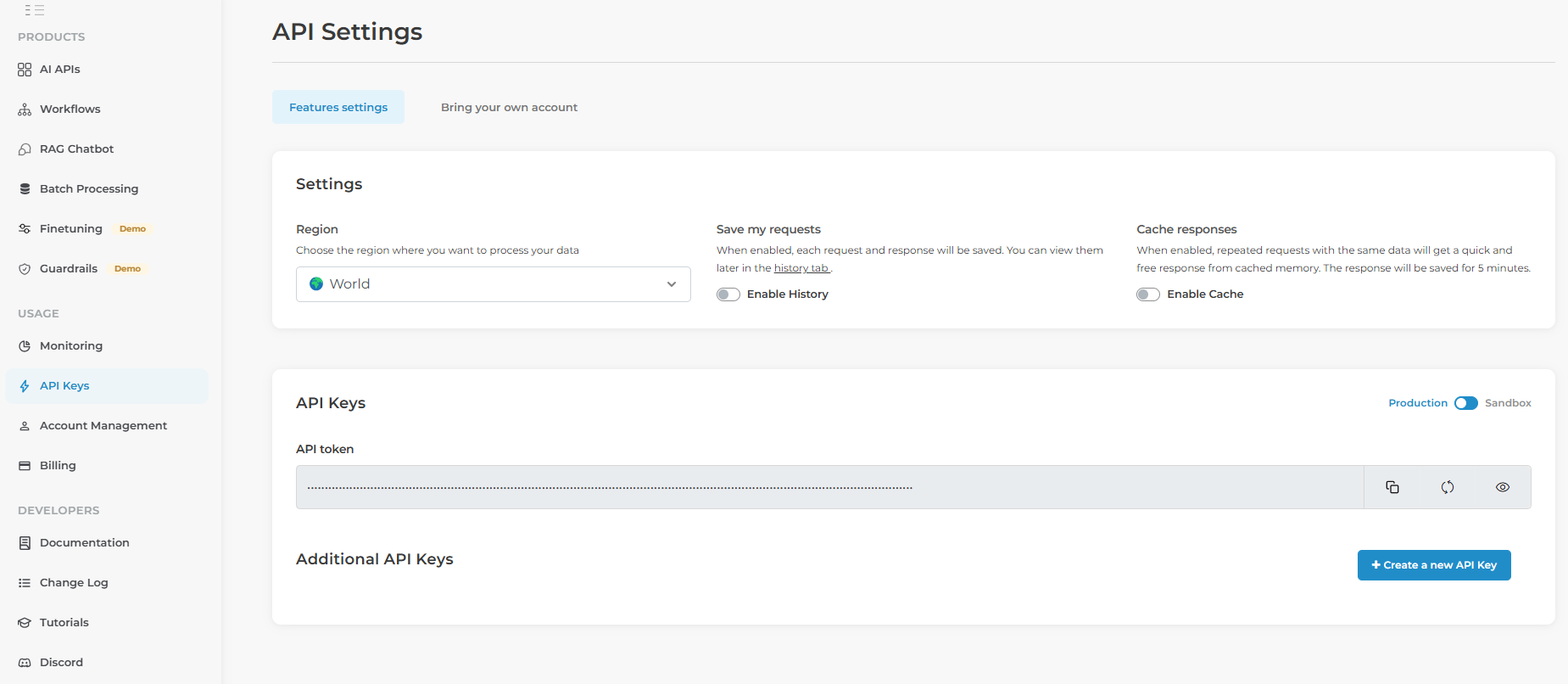
2. Access Text Processing Technologies: After logging in, navigate to the text processing section of the platform.
3. Select AI Content Detection: Choose the AI Content Detection feature.
Live Test Models on Eden AI
Eden AI offers live testing on various AI models for different purposes, including AI detection. To test the models, you can use their web interface or interact with them directly through API calls, as described in the examples below.
Implementing AI Content Detection in Python
Install Python's Requests Module
Before you can begin coding, make sure you have the necessary Python module installed. You can install it using pip:
pip install requestsThe requests module will allow you to send HTTP requests to Eden AI’s API. It handles API interaction, sending data, and receiving responses.
Example Code
Here’s how you can use Python to interact with the Eden AI API and detect AI-generated content in a text string:
import json
import requests

headers = {
    "Authorization": "Bearer YOUR_API_KEY"
}

url = "https://api.edenai.run/v3/universal-ai"
payload = {
    "model": "text/ai_detection/winstonai",  # or text/ai_detection/sapling
    "input": {"text": "Your text here to check for AI content (at least 300 characters)."}
}

response = requests.post(url, json=payload, headers=headers)

result = json.loads(response.text)
print(result["output"]["items"])- headers: The authorization header includes your API key, which is required for authentication.
- url: This is Eden AI’s Universal AI endpoint, which serves expert models such as AI content detection.
- payload: The payload contains the parameters sent to the API. In this case, "model" specifies the feature, subfeature and provider to use (e.g., "text/ai_detection/winstonai"), and "input" holds the "text" you want to check, which must be at least 300 characters long.
- requests.post(): Sends a POST request to the Eden AI API with the payload and headers.
- json.loads(): Converts the API’s response from JSON format into a Python dictionary, allowing easy access to the result.
Interpreting the Results
The results returned from the API will show whether the text is likely AI-generated or not. The result will include scores or a classification indicating the probability that the text was generated by AI. Here is an example output:
{
  "status": "success",
  "cost": "0.006020000",
  "provider": "winstonai",
  "output": {
    "ai_score": 0.9922,
    "items": [
      {
        "text": "Artificial intelligence has transformed the way businesses operate, enabling them to automate repetitive tasks, analyze large volumes of data, and make more informed decisions.",
        "prediction": "ai-generated",
        "ai_score": 0.9922,
        "ai_score_detail": 0.9922
      },
      ...
    ]
  }
}
1. "ai_score" : Represents the probability that the content is AI-generated, for the whole text in output and for each sentence in items. A higher score (closer to 1) indicates a stronger likelihood of being AI-generated.
2. "prediction" : The verdict for each sentence (for example "ai-generated").
3. "status" and "cost" : status is success when the provider processed the text, and cost is the price of the request in USD.
Benefits of Using Eden AI’s Unique API
Eden AI provides a range of features that make it the ideal solution for detecting AI-generated content and streamlining your workflows:

Multiple AI Engines in One API
Eden AI provides access to various AI models (e.g., Winston AI, Sapling) through a single, easy-to-use API, saving time and effort compared to managing multiple services.
Save Time and Cost
With a unified API, Eden AI simplifies integration, allowing seamless switching between models.
Easy to Integrate
Eden AI standardizes the JSON output format, making integration with your application smoother and eliminating the need to handle different formats.
Customization
Eden AI allows quick third-party platform integration and offers custom connectors. Their documentation provides guidance for tailoring API requests to your needs.
Conclusion
Detecting AI-generated content is increasingly vital, and with tools like Eden AI, this process is both simpler and more dependable. Whether you're using text data for content moderation, plagiarism detection, or verifying authenticity, Eden AI offers the tools you need to stay ahead.
In this article, we’ve explored how to use the Eden AI API to detect AI-generated content with Python, including how to obtain an API key, implement the detection process, and interpret the results.
Don’t hesitate to experiment with various providers and settings to find the best solution for your needs!
Next Steps in Your Project
Eden AI is not just a tool—it’s a partner in your AI detection journey. Here’s how they can help take your project further:
Product Demo and Consultation: Book a session with Eden AI’s team to better understand how their API can meet your needs.
- Product Demo and Consultation: Book a session with Eden AI’s team to better understand how their API can meet your needs.
- Expert Support: Gain valuable insights and advice from Eden AI’s experts to find the optimal provider combinations for your project.
- Third-Party Integration: If you need further customization, Eden AI can quickly develop connectors to integrate their API into other platforms.